
Clean Junk Plus
Hatif Welfare AppsTools
3.613.00 Reviews
- Version
- 1.0.1
- Installs
- 100.00K
- Age Rating
- Everyone
Screenshots
Our Review of Clean Junk Plus
 Analysis by Appyee
When a phone is shared around a home, small storage problems quickly become everyone’s problem. A full device can make it harder to save photos, install an update, or download something needed for school or work. I approached Clean Junk Plus as a practical cleaning tool for that situation, rather than as an app that promises to transform a phone overnight. Its purpose is straightforward: help care for a phone and make everyday use feel less cluttered.
In my experience, the most useful way to judge it is not by how dramatic the cleaning process looks, but by whether it helps a household make sensible decisions about a shared device. A family phone, a spare handset, or a tablet used by several people needs a little more care than a personal device. One person may want to keep every image, while another may simply want enough room for an important download. That is where a junk-cleaning tool can be useful, provided the person using it slows down before removing anything.
Clean Junk Plus is a free tools app from Hatif Welfare Apps. It is intended for everyone, which makes its general audience broad, but that does not mean every cleaning decision should be handed to a child or made without checking. The app is best treated as a helper for reviewing clutter, not as an automatic permission slip to erase files.
How Clean Junk Plus fits into a shared phone
A realistic household example is a phone kept in the kitchen or living room. Several people use it for calls, photos, messages, recipes, music, and occasional downloads. After a while, temporary files and forgotten items can make the device feel slower to manage, even when nobody remembers deliberately filling it. Someone then opens Clean Junk Plus before a trip, a school project, or a family event and uses the cleaning process to look for unnecessary material.
The benefit in that moment is organizational. Instead of searching through folders one by one, the user gets a focused place to begin checking the phone. That can be less intimidating for a relative who is not comfortable with Android settings. I would still keep the final decision with the person who understands what is stored on the device, because a shared phone often contains mixed personal and household material.
This distinction matters. A file that looks unimportant from a technical point of view may still have personal value. A downloaded document could be needed later, an image may belong to one family member, and a cached item may be convenient to recreate but annoying to lose at the wrong time. My preferred workflow is to open the app when the phone is not urgently needed, review what it identifies, and remove only items that the household has already agreed are disposable.
That approach makes the app more useful than a rushed “clean now” habit. It turns storage maintenance into a short shared routine. For example, one person can identify old clutter while the owner of a particular folder confirms whether it matters. On a personal phone, that extra conversation may be unnecessary. On a shared device, it prevents avoidable arguments and accidental loss.
What I would do before the first cleanup
Before using any cleaning option, I would make sure the phone is not in the middle of an important task. I would finish pending downloads, close anything that should not be interrupted, and ask other users whether they are keeping recent files. This is simple preparation, but it is particularly important when several people depend on the same handset.
I would also separate urgent storage pressure from general tidying. If the device needs space immediately, the safest first move is to inspect obvious large items that everyone recognizes, such as duplicate downloads or files that were created for a task already completed. If there is no immediate pressure, I would use Clean Junk Plus as a review tool and avoid deleting merely because an item appears old.
The app’s current version is 1.0.1, so I would keep expectations realistic. An early version can be perfectly useful for a focused job, but I would not assume that it replaces every storage screen built into the phone. Android’s own storage tools remain important because they show system-level information and app-specific usage in a familiar setting. Clean Junk Plus makes more sense as an approachable additional layer, especially for someone who wants a simpler starting point.
A practical tip is to ask each regular user to identify one folder or type of content they consider private before cleaning begins. That creates a boundary even if the phone itself has no separate user setup. It also avoids treating household ownership as permission to inspect everything. The technical job is cleaning; the social job is agreeing what can be cleaned.
Boundaries matter more than convenience
Shared-device use creates a limitation that no cleaner can solve by itself: the app cannot know the emotional or practical value of every file. A temporary-looking item might be the only copy of a receipt. An old image might be important to a child or an older relative. A document that appears unused may be needed during an appointment. I therefore see the strongest boundary as human review, not automation.
If a child uses the phone, I would let them ask for a cleanup rather than letting them make broad deletion decisions alone. The everyone age context makes the app approachable, but it should not be confused with a family-management system. The app can be suitable for a household with younger users while the adult remains responsible for the final action. That is a sensible arrangement for any utility that deals with personal files.
For an older family member, the appeal is different. The value may come from having one clear place to begin instead of navigating several settings menus. I would sit with them during the first use, explain that cleaning suggestions still need checking, and agree on a repeatable rule: remove only what is recognizable, replaceable, and no longer needed. Once that habit is established, the app becomes less stressful and more predictable.
There is also a privacy boundary between household coordination and account access. Clean Junk Plus should not be treated as a way to manage several people’s accounts, messages, or personal decisions. If each person has a separate account or profile on a device, I would respect those boundaries and ask before inspecting anything that clearly belongs to another user. The app can support device care, but it does not replace trust between the people using the phone.
Coordinating a cleanup without creating confusion
My preferred household method is to choose one person as the session lead. That person opens Clean Junk Plus, explains what is being reviewed, and pauses when a file is unclear. Other users do not need to crowd around the phone; they only need a chance to identify anything important. This keeps the process short while still giving everyone a voice.
A second useful habit is to clean after a known event rather than constantly. After a holiday, a move, or a school project, temporary downloads and repeated images are easier to recognize because everyone remembers why they were created. Cleaning at that point is safer than opening the app randomly and guessing what can go. It also gives the household a clear reason to review the phone.
I would avoid promising a specific amount of recovered space. The result depends on what has accumulated and what the user chooses to remove. A cleaner can help reveal opportunities, but it cannot manufacture storage or fix every cause of a phone feeling crowded. If the real issue is a large personal media collection, the better answer may be moving selected files elsewhere or changing how they are stored, not repeatedly deleting small temporary items.
This is one of the clearest trade-offs compared with using only the phone’s built-in tools. Android settings can provide a broad overview and may be the better choice when someone needs to understand which installed apps consume the most room. Clean Junk Plus is more appealing when the user wants a focused cleaning session and does not want to begin with a long list of system menus. I would use both selectively rather than choosing one as a total replacement for the other.
Compared with manually browsing folders, the app can save attention. Manual browsing gives the user maximum control, but it is easy to miss clutter and tedious on a shared phone. Clean Junk Plus offers a more guided starting point. The cost of that convenience is that the user must pay attention to its suggestions and avoid treating every suggestion as universally safe.
Age, trust, and the person holding the phone
The everyone rating is appropriate for a general-purpose cleaning utility, but age suitability and decision-making responsibility are not the same thing. A child may be able to understand the buttons while still lacking the context to know whether a file belongs to a parent, a sibling, or an important household task. I would let younger users participate in identifying obvious clutter, but I would keep deletion approval with an adult or the file owner.
Teenagers may reasonably want more independence, especially on a device they use most of the time. In that case, a simple agreement works better than constant supervision: do not remove another person’s files, stop when an item is unclear, and ask before cleaning shared folders. These rules are not special features of the app; they are the practical safeguards that make a cleaning tool fit a mixed-age household.
Trust also affects whether the app is a good choice at all. If users are uncomfortable with one person reviewing the device, I would not force a joint cleanup. The phone’s owner should be present, or each person should handle their own area through the normal system tools. A convenient utility is not worth damaging confidence between family members.
For a single-user phone, this concern is much smaller. I can inspect my own files quickly and decide what stays. That is where Clean Junk Plus feels most direct: it gives me a dedicated maintenance task without requiring me to think about other people’s material. The shared-device angle adds value, but it also makes careful behavior essential.
Where the app is helpful and where another choice wins
I would recommend Clean Junk Plus to someone who wants a free, approachable tool for routine phone housekeeping, especially when the device is used by several people and nobody wants to search through every folder manually. It can also suit a user who feels lost in detailed Android menus and prefers to begin with a dedicated cleaning interface.
I would choose the built-in storage controls instead when the main question is broader than junk. If I need to find the largest apps, understand a system storage warning, or make a deliberate decision about uninstalling software, the phone’s own settings are usually the more informative destination. A dedicated cleaner should not be expected to explain every storage problem.
I would also skip a cleanup session when the phone contains irreplaceable photos or documents and nobody is available to verify them. In that situation, making a backup or manually reviewing files is more important than speed. The same applies when the device is showing a serious technical problem rather than ordinary clutter. A cleaning app may be useful later, but it is not a substitute for diagnosing hardware, operating-system, or account issues.
One non-obvious strength is that the app can encourage better household habits even when the recovered space is modest. The conversation around what people download, keep, and forget can prevent the phone from becoming chaotic again. One non-obvious weakness is the opposite: if users trust the cleaning process without discussing ownership, the shared nature of the device can turn convenience into friction.
Another useful trade-off is frequency. Running a cleaner after every small storage change may create unnecessary interruptions and make users delete things impulsively. A short review after a completed project or a period of heavy photo-taking is more sensible. That schedule keeps maintenance intentional and gives people a reason to recognize the files being considered.
My household verdict
Clean Junk Plus is a focused tools app that makes the most sense when the goal is to bring some order to a phone without turning storage maintenance into a technical project. Hatif Welfare Apps presents it as a free option, and its broad everyone rating makes it easy to consider for general household use. It has also reached over one hundred thousand installs and holds a 3.6 average from more than one hundred ratings, so there is already a visible group of users trying it.
Those figures do not change my main advice: use it thoughtfully. The app is not a replacement for backups, built-in storage settings, or a conversation about who owns the files. Its best role is as a guided first step for identifying clutter, followed by a human decision about what should actually disappear.
For a family or shared phone, I would install Clean Junk Plus when one person can lead the process and everyone understands the boundaries. I would begin with obvious, replaceable clutter, pause over anything personal, and keep the owner of important files involved. That workflow gives the app a fair chance to help without asking it to solve problems that belong to the household.
My final view is positive but measured: the safest cleanup is the one that combines a useful tool with deliberate human review. If that is how you plan to use it, this free app is worth trying. If you need detailed storage diagnosis, strong account separation, or hands-off protection for several users, the usual phone settings and clearer household rules will serve you better.
Verdict
Strengths of Clean Junk Plus
- Quickly identifies cached files and leftover app data.
- Simple interface makes routine cleaning easy for beginners.
- Can help free storage without requiring root access.
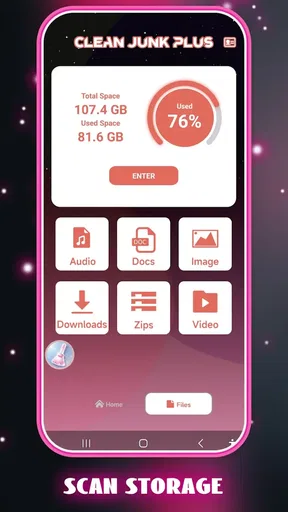
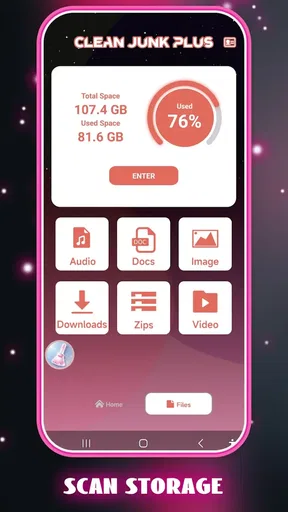
- Useful storage overview shows which categories use the most space.
- Includes tools for removing duplicate or unnecessary files.
Limitations of Clean Junk Plus
- Some cleaning features may require intrusive storage permissions.
- Automatic cleanup suggestions can occasionally need manual checking.
- Ads may interrupt the experience in the free version.
- Results can vary depending on Android version and device brand.
- Deleting files is not easily reversible, so important data needs care.
Similar Picks in This Category
View All
Google LLC4.0

Gboard - the Google Keyboard
Google LLC4.5

Google Play services
Google LLC4.3

Google Play Store
Google LLC4.9

Files by Google
Google LLC4.5

SHAREit: Transfer, Share Files
Smart Media4U Technology Pte.Ltd.4.3
Frequently Asked Questions
What is Clean Junk Plus and what does it do?
Clean Junk Plus is designed to help users identify and remove unnecessary files that may be taking up storage space on an Android or iOS device. Depending on the version available for your platform, its tools may include junk-file scanning, cache cleanup, duplicate-file detection, large-file management, and basic device-maintenance features. It is best viewed as a storage-management utility rather than a guaranteed performance booster.
Is Clean Junk Plus safe to use on my phone?
Clean Junk Plus can generally be used safely when downloaded from the official Google Play Store or Apple App Store and when its permissions are reviewed carefully. Before confirming a cleanup, check the files selected for deletion because some items may still be useful. Avoid unofficial APK files, read the privacy policy, and remember that no cleaner should require unnecessary access to sensitive information such as contacts, messages, or personal accounts.
Can Clean Junk Plus really make my device faster?
The app may improve the available storage situation by removing temporary files, leftover installation data, and other unnecessary content. However, the effect on speed depends on the device, its age, free storage, and the type of files found. Modern Android and iOS systems already manage memory efficiently, so users should not expect dramatic performance improvements simply from clearing cache or closing background applications.
Will Clean Junk Plus delete my photos, videos, or important files?
A reputable cleaner should not automatically remove personal files without showing what will be deleted, but users should still review every suggested category before starting a cleanup. Duplicate photos, large videos, downloads, and unused documents can sometimes be identified as disposable even when you want to keep them. Create a backup first and use preview, selection, or recovery options whenever they are available.
Is Clean Junk Plus free, and are there in-app purchases or subscriptions?
The availability of free tools, advertisements, premium functions, and subscription plans can vary by platform, region, and app version. Before downloading, check the store listing for the current pricing details and review the subscription terms carefully. If a trial is offered, confirm its renewal date and cancel it through your Google Play or Apple account settings if you decide not to continue.
